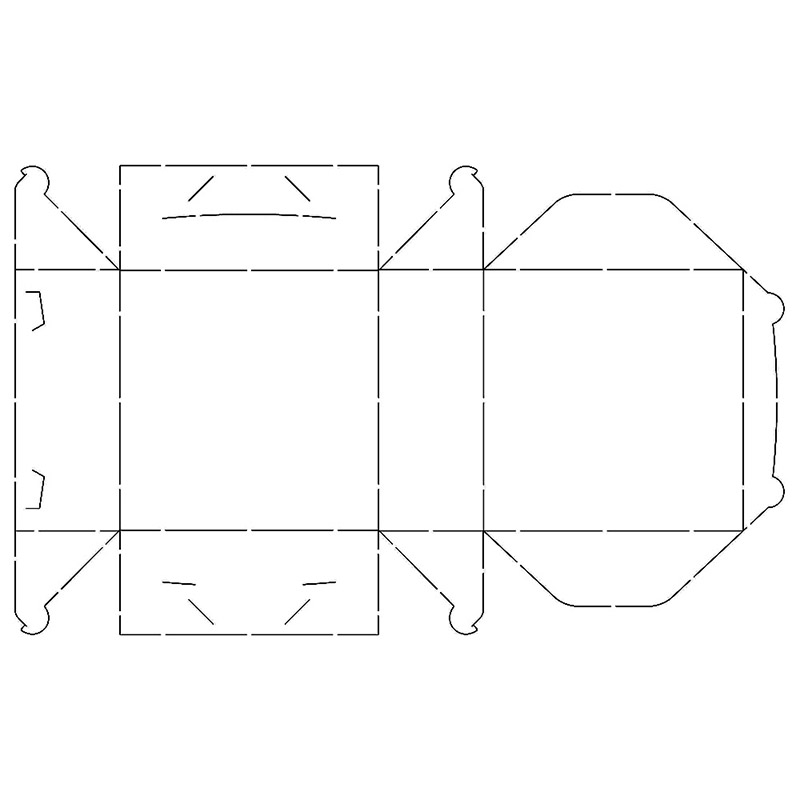
Within packaging and printing workflows, a dieline is a technical template that defines the final production layout. It marks cut lines and fold positions on a flat box blueprint. The word dieline originates from the term “die”, which refers to the physical tool that cuts material to exact specified dimensions.
What Is a Dieline?
If you are new to packaging terminology, it is important to understand exactly what dielines do. A dieline is the technical template used to cut packaging material accurately. For box manufacturing, the dieline defines internal dimensions for the finished package and contains all reference points for printed artwork, graphics, color textures, and typography. Brands rely on dielines to map every critical detail of their packaging. They act as official manufacturing guidelines for box production.
Most customers share their desired product visual concept with printing suppliers. This gives production teams a clear vision for finished custom product boxes. For example, when producing a specially‑shaped product box, the dieline defines exact sizing and shows how the assembled box will look.
Breakdown of Different Lines Within a Dieline
A complete dieline contains several distinct line types. Below is an explanation for each:
- Fold lines: These lines indicate where the flat stock will bend to form the finished box, traditionally marked in red.
- Cut lines: These lines must align precisely for quality printing. Usually shown in black, they mark all positions where material will be trimmed.
- Bleed lines: Marked in light‑blue or green, bleed lines define extra margin space around your artwork. This buffer prevents unwanted design cropping or distortion during trimming.
- Safety lines: These lines mark your safe inner boundary. All key graphics, logos and text must sit inside this area to avoid being trimmed off. Important design elements should never cross past the safety margin.
- Glue tabs: This designated area is reserved for adhesive when assembling the finished box.
The Importance of Dielines for Packaging Production
Dielines deliver huge practical value for packaging designers and manufacturers. They support space‑efficient, well‑optimized box designs. Let’s break down their core benefits:
Acts As a Communication Bridge
A box dieline serves as shared technical language between graphic designers and production teams. It removes ambiguity around how the final box should look and perform. Working from a proper dieline helps produce cost‑effective packaging and reduces material waste.
Delivers Precise Dimensions
Customers provide key details including product type, item size and other requirements. Dielines translate this information into precise box geometry, accurate angles and exact measurements for manufacturing.
Guarantees Consistent Design Quality
One major advantage of using dielines is improved design reliability. When you follow dieline specifications correctly, you achieve clean, predictable printed results. Dielines help you catch layout flaws early before they turn into costly finished‑box defects.
Saves Both Time and Production Costs
Dielines simplify work for print manufacturers. Clear technical references reduce guesswork, cut down revision cycles and limit wasted raw materials. This makes dielines a key ingredient for economical custom packaging production.
How To Create a Packaging Dieline
If you are building a dieline for the first time, the process can feel intimidating at first, but becomes straightforward with practice.
One practical starting point is to take physical measurements from an existing sample box. You can also work from customer‑provided design models as a reference.
Next, select suitable design software. Popular industry tools include Adobe Illustrator, the full Adobe Creative Suite, and ArtiosCAD. There is no single mandatory tool; you can choose software according to your own workflow or follow any tool preferences shared by your client.
Key Rules for Building a Flawless Dieline
If you are a packaging designer aiming to create error‑free dielines, follow these critical best‑practice guidelines:
- Always create dielines as vector‑based artwork. Vector files use mathematical coordinates required for accurate cutting and printing.
- Double‑check every dimension and technical specification entered into your dieline file.
- Produce a physical hard‑copy print‑out proof before mass manufacturing. This lets you spot layout weaknesses before large‑scale production starts.
- Dieline creation is collaborative work. Involve different team members from the early stages. Multiple sets of eyes help catch mistakes and deliver error‑free final packaging, avoiding disappointment further down the workflow.
Dieline Production Equipment
Professional die‑cutting machines are used to produce physical boxes from digital dieline files. High‑quality, modern equipment is essential to translate your digital template into precise finished packaging.
Conclusion
Dielines are fundamental for high‑quality custom packaging. Understanding dieline workflows is essential for successful box customization.
You do not need to be a professional graphic artist or dieline specialist to order great packaging. At A BOX STORE, we handle all technical dieline work for you. Our team delivers premium, professional custom packaging solutions at budget‑friendly prices to satisfy all your brand requirements.