Ultimate Guide to Choose Color Models for Printing Designs
Looking for practical guidance to select the right color model for your packaging print designs? Before jumping in, it is critical to understand how color printing actually works. Once you grasp its core principles, you will be able to confidently pick the ideal color scheme for your printed artwork.
What Is Color Printing?
Color printing is the process of reproducing images and text in full‑color output. Why does color printing matter? Quality color output adds polish, professionalism and sophistication to physical prints. For instance, a logo rendered with well‑selected colors strengthens instant brand recognition. This guide focuses on two dominant industry color models: CMYK and RGB, each with unique characteristics and intended applications.
Elevate Your Print Designs With Proper Color Models
CMYK and RGB are frequently misunderstood acronyms in graphic and packaging design. There is long‑standing debate over which model is superior. Below we break down how CMYK and RGB operate, and which one you should use for printed packaging work.
RGB vs CMYK
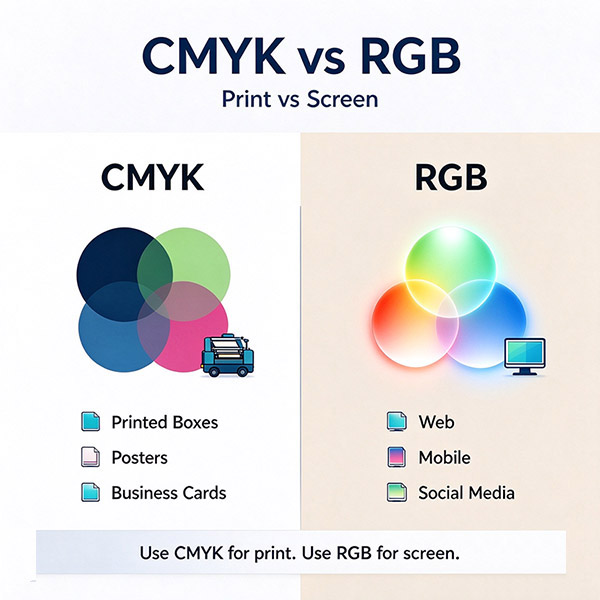
The core difference between CMYK and RGB lies in their intended output medium. CMYK (Cyan, Magenta, Yellow, Key‑Black) is built for physical printed output such as brochures, posters and business cards. RGB (Red, Green, Blue) is designed exclusively for digital screen display: monitors, televisions, mobile devices and websites.
RGB Color Model
RGB mixes three primary light‑based colors: Red, Green and Blue to generate millions of different hues. This model powers everything you view on digital screens. Mixing equal intensities of two primary light colors yields new secondary colors:
- Green + Red = Yellow
- Green + Blue = Cyan‑Blue
Primary Uses for RGB
RGB was developed alongside LED and screen technology for digital displays including computer monitors, TVs, smartphones, tablets and digital cameras. Human eyes perceive these light‑based colors vividly, making RGB ideal for high‑brightness on‑screen visuals.
Common RGB applications: ‑ Web & app UI design ‑ Social‑media graphics ‑ Digital branding assets ‑ All on‑screen visual content
Recommended File Formats for RGB
‑ JPEG: widely compatible, best for photographs ‑ PSD: layered working source files ‑ PNG: supports transparency for icons and graphics ‑ GIF: for simple animated assets
Avoid TIFF, EPS and PDF for final RGB web deliverables; they may cause compatibility issues across platforms.
CMYK Color Model
CMYK works in the opposite logic of RGB. It is an ink‑based color system for physical printed products, also known as four‑color process printing. Printing presses layer cyan, magenta, yellow and black ink to build final images, logos and artwork.
Key principle difference: mixing RGB light produces white; mixing CMYK inks produces deep black. Primary ink mixtures: ‑ Cyan + Magenta = Blue ‑ Magenta + Yellow = Red ‑ Cyan + Yellow = Green
Blending multiple CMYK inks creates deeper, darker tones rather than brighter shades.
Leverage CMYK for Rich, Dark Printed Hues
If you want saturated, deep colors on physical packaging and promotional materials, CMYK is your correct choice. Brands rely on this model for packaging, marketing collateral and retail‑ready print pieces.
Common CMYK Applications
Use CMYK for all physical printed items: Business cards, billboards, brochures, flyers, stickers, promotional merchandise, restaurant menus, brand packaging and retail print collateral.
Best File Formats for CMYK Print Production
‑ PDF: highest compatibility with most printing equipment (preferred) ‑ AI: native Adobe Illustrator working files ‑ EPS: vector‑based print files
Always confirm acceptable file formats directly with your printing supplier before submitting final artwork.
Conclusion
Achieving accurate color reproduction for packaging and print projects can be challenging, yet manageable with the correct color model and proper prepress workflow. Modern design tools simplify the creative process, but selecting the right color space remains critical. Partner with an experienced, reputable packaging printer to get consistent, high‑quality finished results.